If you have searched "Instagram Seo Optimization," you are probably already read three articles that say the same things which are add keywords to your bio, use hashtags, post consistently. All true. None of it explains why your last ten posts got zero reach from people who don't already follow you.
Here's the part most guides skip: Instagram changed how search works in the last year, and a chunk of the advice still floating around is actively outdated. Google now indexes public Instagram posts. Hashtags got capped at five. The algorithm reads text inside your images and transcribes what you say out loud in Reels. If your strategy hasn't caught up, you are optimizing for a version of Instagram that does not exist anymore.
This guide walks through what's actually true right now, and gives you something to do with it.
What Is Instagram SEO Optimization? (And Why It's Different Now)
Instagram SEO is the process of making your profile and content easy for Instagram's algorithm and its search bar to match with what people are typing in. That's it. It's not a hack. It's the same basic idea as Google SEO, help the system understand what you are about, so it shows you to the right people.
What's changed is the stakes. Since July 2025, Google has been indexing public posts from professional Instagram accounts. That means a well-optimized caption does not just help you inside the app anymore. It can show up in a Google search too. Your Instagram content is now competing for visibility in two places at once, which is a bigger deal than most creators realize.
It's also worth separating this from "Instagram growth" advice in general. Growth tactics (collabs, giveaways, posting times) are about squeezing more reach out of the audience you already have or the algorithm's general goodwill. SEO is specifically about being found by people who've never heard of you and are actively typing a search into the box. Different goal, different tactics.
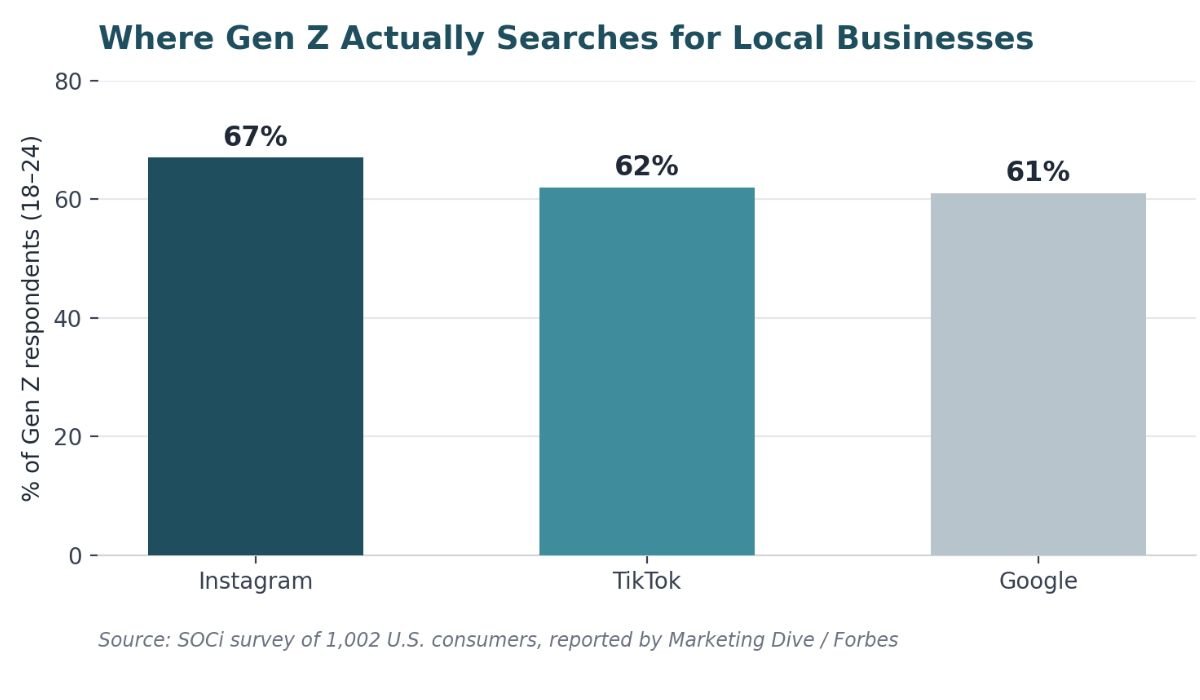
And the "why now" is backed by real numbers, not a vague trend. In a SOCi survey of over 1,000 U.S. consumers, Gen Z respondents ranked Instagram as their top platform for local search — ahead of both TikTok and Google:
| Search Platform | Gen Z Preference (Local Search) | Key Insight |
|---|---|---|
| #1 Ranked | Top choice for local discovery among Gen Z | |
| TikTok | #2 Ranked | Strong but second to Instagram |
| #3 Ranked | Still vital, but Gen Z looks elsewhere first |
Based on SOCi survey of 1,000+ U.S. consumers
If your content isn't searchable, you are invisible to a huge chunk of exactly the audience you want.
How Instagram Search Actually Works (Search vs. Explore vs. Reels vs. Audio)
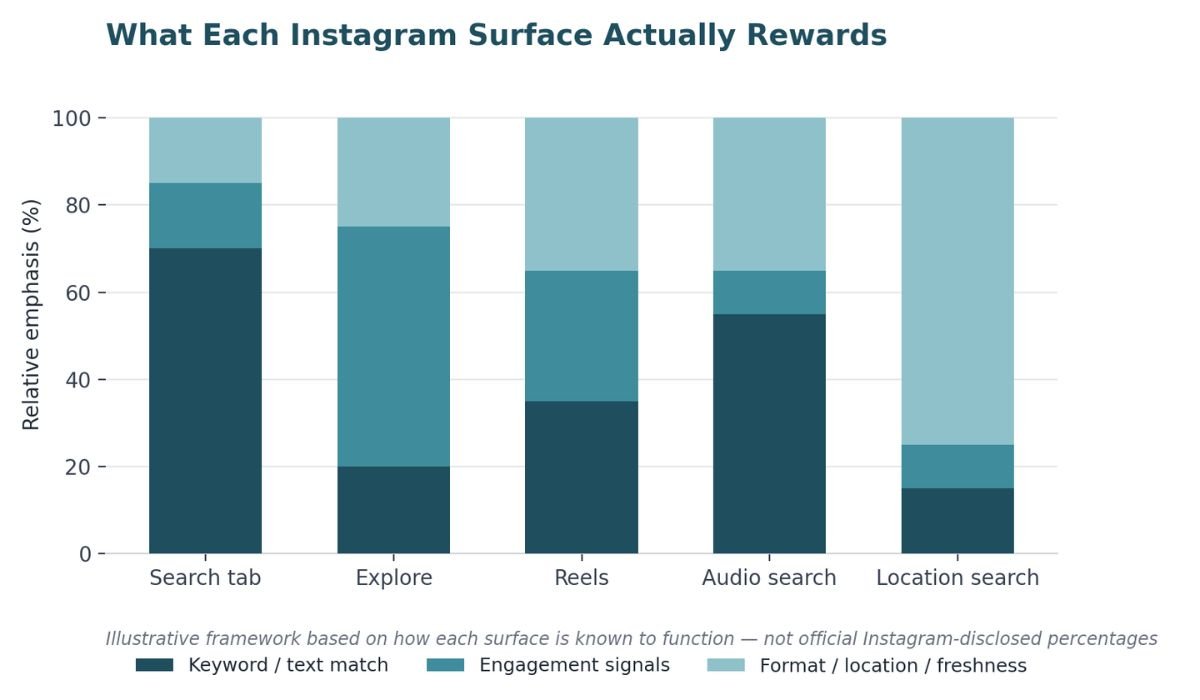
This is the part almost every other article flattens into one blob called "the algorithm." In reality, you are optimizing for several different systems, and they don't all care about the same things.
The Search tab is the closest thing Instagram has to Google. When someone types "vegan meal prep" into the search bar, Instagram is matching that text against your name field, bio, captions, and alt text. This is straightforward keyword matching the most literal form of SEO on the platform.
Explore works differently. It's not driven by what you typed, it's driven by what you have already liked, saved, and lingered on. Your job here isn't keyword stuffing, it's making content similar enough to what a user already engages with that Instagram feels confident recommending you to them.
Reels recommendations lean heavily on watch time, replays, and whether people finish the video. Keywords still matter (more on that below), but a Reel with perfect SEO and a weak first three seconds still won't get pushed, because completion rate is doing a lot of the ranking work.
Audio/sound search is the one nobody talks about: Instagram transcribes the spoken audio in your Reels and uses it as a search signal. If you say your keyword out loud in the video, that's now something the algorithm can match against a search query, even if you never typed the word anywhere.
Location search is its own lane too. Geotags feed into a separate discovery surface for anyone searching by place, which matters a lot if you are a local business or creator building a regional audience.
The takeaway: don't optimize as if there's one algorithm to please. Decide which surface actually matters most for your content, and lean into what that surface rewards.
What Changed for Instagram SEO Optimization in 2025–2026 (Read This Before You Optimize Anything)
This is the section that save you the most wasted effort, because a lot of standard advice is now wrong.
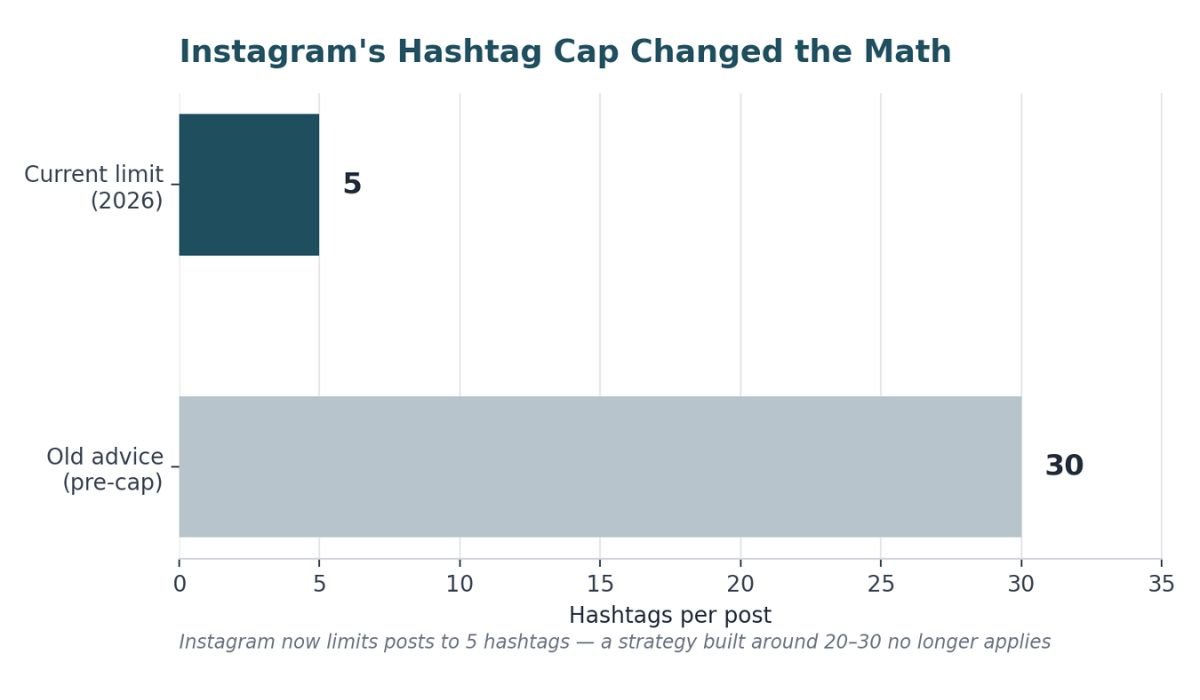
Hashtags are capped at five — Instagram quietly reduced the maximum number of hashtags per post. If you are still following "use 20-30 hashtags, mix broad and niche" advice, you are either getting ignored by the app or, worse, flagged as spammy for trying to work around the limit. Five well-chosen hashtags now beat thirty scattered ones — pick the ones that actually describe the post, not the ones with the biggest follower counts behind them.
Hashtag-follow is gone — People used to be able to follow a hashtag the way they'd follow an account, which made ranking for a hashtag a long-term discovery channel. That mechanism does not exist anymore, which means hashtags now function more like a one-time categorization tag than a subscription feed. Their job shifted from "ongoing reach" to "helping the algorithm file your post correctly."
Google indexes your posts — As mentioned above, since July 2025 public posts from professional accounts can appear in Google search results, which means your captions are now doing double duty as on-page copy for two search engines, not one.
If you take one thing from this whole guide, take this: re-check any Instagram SEO advice you have been following before this year. The platform moved, and a lot of content hasn't caught up.
Optimize Your Profile First
Before you touch a single caption, fix your profile. This is the foundation everything else builds on, and it's the step new creators skip most often because it feels less exciting than posting content.
Username vs. name field — Your @username is largely fixed and brand-focused on your handle. The name field (the one under your profile photo) is where keywords actually belong, and it has a 30-character limit. If you are a personal trainer named Alex, "Alex" alone in the name field is wasted real estate. "Alex | Personal Trainer NYC" gives Instagram something to match against searches.
Your bio — Two to three lines, and it should read like a human wrote it, not a keyword dump. "Helping busy parents cook 20-minute dinners" does the job of describing you and naturally includes searchable terms which no need to force "meal prep, quick recipes, easy dinners" into a comma-separated list.
Profile category — This is an underused lever. When you set up a professional account, Instagram asks you to pick a category (e.g., "Personal Blog," "Public Figure," "Restaurant"). Pick the one that most precisely matches what you do. It factors into how the app classifies and surfaces your account.
Story Highlights — Instead of naming your highlights "Fun," "Life," or a random emoji, use keyword-rich titles: "Meal Prep Ideas," "Client Results," "Behind the Scenes." It's a small change that turns your profile into another searchable surface instead of decoration.
Switch to a professional account — If you are a new user still on a personal account, this is step zero — you don't get Insights, category tags, or contact buttons without it, and none of the SEO tactics below will show up in the data you need to track them.
Keyword Research for Instagram (It's Not the Same as Google)
Instagram keyword research does not need a paid tool to start. It needs you to actually use the search bar the way your audience does.
Type a term related to your niche into Instagram's search bar and look at the autosuggestions. If you run a skincare account and type "retinol," the suggestions Instagram serves back to "retinol for beginners," "retinol routine," "retinol before and after", are phrases real users are searching, straight from Instagram's own data. That's free, zero-tool keyword research sitting in plain sight.
Search intent on Instagram skews differently than Google too. People are not typically looking for a definition they are looking for inspiration, a tutorial, a local recommendation, or proof something works (think "before and after," "tutorial," "review"). Write content that matches that intent, not a Wikipedia-style explanation.
Once you have got a shortlist of terms, check what similar accounts in your niche are ranking for. Look at their bios, their most-saved posts' captions, and which hashtags show up repeatedly. You are not copying them you are finding the gaps they haven't covered yet.
Then place those keywords where they'll actually be read by the algorithm: name field, bio, captions, and alt text. "Use keywords" is vague advice. These four fields are where it's specific.
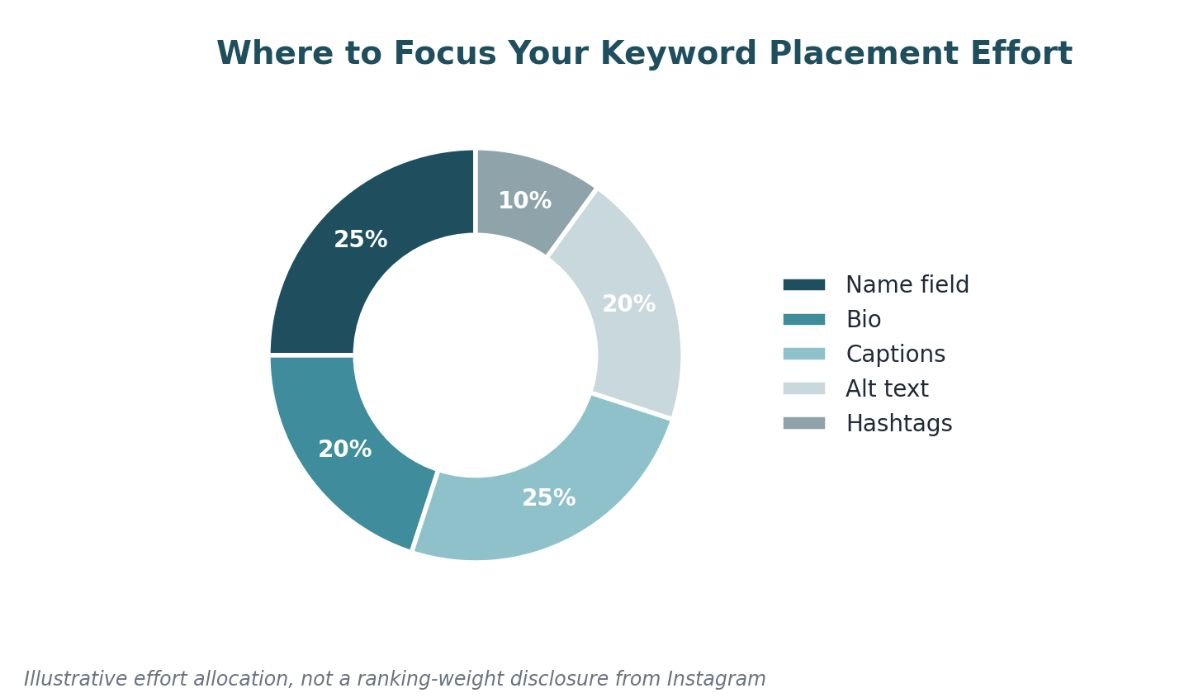
On-Content Optimization: Captions, Alt Text, and Hashtags
Captions — Write the caption for a human first, then check whether your target keyword appears naturally in the first sentence or two. If it does not fit without sounding forced, don't force it Instagram's own guidance explicitly discourages keyword stuffing, and readable captions get better engagement anyway, which itself feeds the algorithm.
Alt text — This is the most skipped tactic in Instagram SEO, and one of the highest-leverage. When you post, tap "Advanced Settings" to "Write Alt Text" and describe the image with actual detail not "photo," but "woman doing a barbell squat in a home gym." Alt text was built for accessibility, but Instagram also uses it to understand image content for search. It takes fifteen seconds and almost nobody does it.
Hashtags/post-cap — With the five-hashtag limit, treat each one like it costs you something (because it does every irrelevant hashtag is a wasted slot). Use a mix: one or two describing the specific content, one or two describing your niche broadly, and skip anything banned or overused just to chase reach. A flagged or shadow banned hashtag can quietly suppress the whole post.
Geotagging — This barely gets a mention in most Instagram SEO content, but it's a real ranking input especially for local search. If you are a bakery in Austin, tagging your location isn't just a nice-to-have, it's how you show up when someone searches "bakery near me," behavior translated to Instagram's location-based discovery.
Optimizing Reels for Search & Discovery
Reels get their own section because they're increasingly the entry point for new followers, and they're optimized differently than static posts.
Say your keyword out loud — Since Instagram transcribes spoken audio in Reels, a video where you literally say "here's how I meal prep for the week" is giving the algorithm a searchable text signal that a silent photo post can't provide. If your niche allows for it, narrate.
Burn in on-screen text — Separate from your caption, on-screen text overlays are read as a distinct signal. A Reel that opens with "3 signs your sourdough starter is ready" on-screen is reinforcing the same keyword two different ways to spoke and visual which stacks your odds of matching a search.
Trending audio vs. original audio — Trending sounds can get you a short-term reach spike because Instagram is actively pushing that audio, but original audio is what gets transcribed and tied specifically to your content for search purposes. If discoverability is the goal (not just a reach spike), lean toward original audio with your keywords spoken in it.
Thumbnails matter more than people think. A cover image that looks like a screenshot of a boring moment gets scrolled past even if the content and SEO are perfect. Pick or design a cover that reads clearly at thumbnail size.
For Top Creators & Deep Searchers: Advanced Tactics
If you have already got the basics locked in, here's where the gains start coming from testing instead of guessing.
Run your own A/B test — Post two similar pieces of content — same topic, same format, where one is fully SEO-optimized (keyword in name field context, alt text, geotag, spoken keyword) and one isn't. Track reach from non-followers and saves over two weeks. This tells you, with your own audience and niche, whether the tactics in this guide are actually moving the needle for you specifically, instead of trusting a generic industry stat.
Track visibility Instagram won't show you directly — Instagram Insights does not give you a keyword rank the way Google Search Console does. The workaround: search your target keywords from a logged-out browser or a secondary account that does not follow you, and see where you land. It's manual, but it's the closest thing to real rank tracking available right now.
Think cross-platform — If your audience is searching Instagram the way they used to search Google, they're probably doing the same on TikTok. The keyword research you did for Instagram is a solid starting point for TikTok to search behavior across these platforms overlaps more than people assume, so build one search-visibility strategy instead of three separate ones.
Common Instagram SEO Mistakes That Hurt Visibility
- Keyword stuffing your bio or captions — "Fitness | Nutrition | Health | Wellness | Gym | Workouts" in a bio reads as spam to both humans and the algorithm. Write a sentence instead.
- Using banned or overused hashtags to chase reach— Some hashtags get flagged for spam association even if your content is completely legitimate using them can suppress the post instead of boosting it.
- Reposting recycled content without changes — Instagram can detect and deprioritize content that's a repost of something already circulating, even from your own account.
- Posting inconsistently — Irregular posting weakens the relevance signals the algorithm uses to decide how often to show you to new people. It's not about "the algorithm punishing you," it's that there's simply less recent data to rank.
- Skipping alt text — Worth repeating: this is the single easiest tactic on this list, and it's the one most accounts still are not doing.
How to Measure If Your Instagram SEO Is Working
Forget vanity metrics for this specifically likes and follower count don't tell you if people are finding you through search. Watch these instead:
- Reach from non-followers — Found in Insights, this is your clearest signal that people who weren't already in your orbit are discovering your content.
- Profile visits after a post — A spike here after publishing usually means the post successfully pulled in curious new people, not just your existing audience.
- Saves and shares — These indicate content useful enough that people want to revisit or pass along, both are strong engagement signals that feed back into future discoverability.
Check these monthly, not post-by-post a single post is noise, a month of data is a trend.
- Name field includes a relevant keyword
- Bio reads naturally and describes what you do
- Profile category matches your niche
- Alt text added on your last 5 posts
- 5 or fewer, relevant hashtags per post
- Location tagged where relevant
- At least one Reel uses spoken keywords
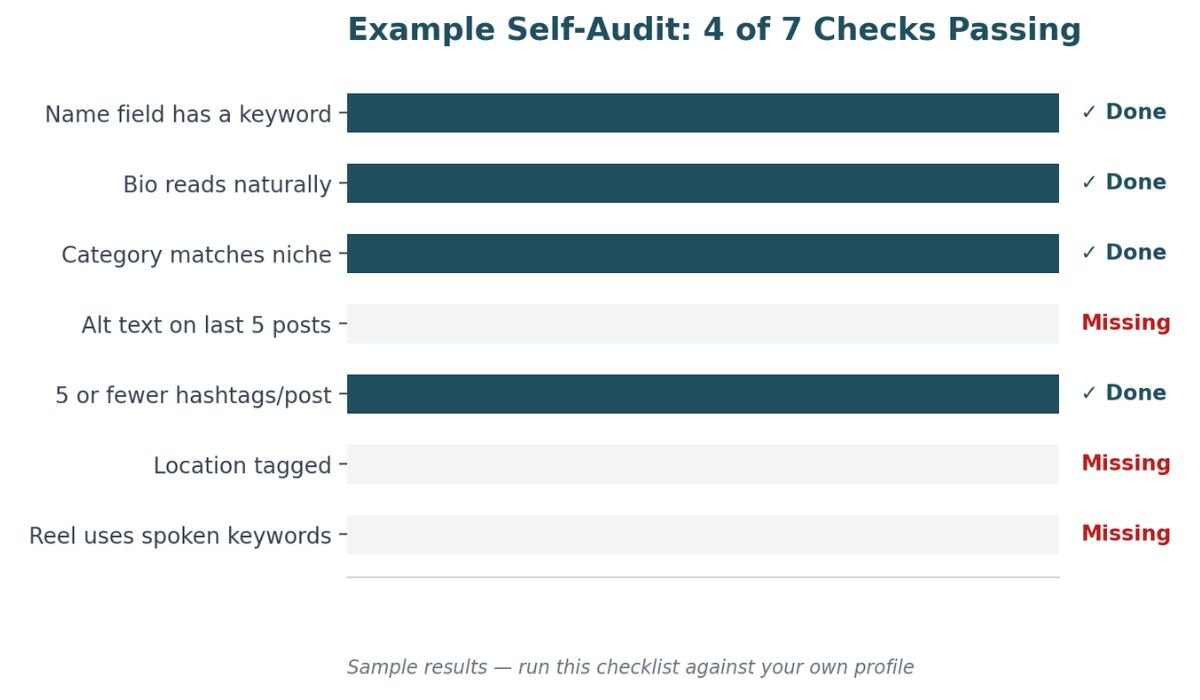
If you are missing more than two or three of these, that's your starting list not the whole guide at once.
That's what a fairly typical "in-progress" account looks like — profile basics handled, but alt text, geotagging, and spoken keywords in Reels still on the table. Those three gaps alone are usually where the easiest wins are hiding, precisely because they're the ones creators skip.
FAQ
What is Instagram SEO optimization?
It's the practice of optimizing your profile and content — name field, bio, captions, alt text, hashtags, and audio. So, Instagram's search and recommendation systems can match you with people actively looking for what you offer.
How do I optimize my Instagram bio for SEO?
Write a natural sentence describing what you do that includes a keyword your audience actually searches, rather than a stacked list of keywords separated by pipes or commas.
Do hashtags still matter for Instagram SEO in 2026?
Yes, but differently the five-hashtag cap and the removal of hashtag-follow mean they now function more as content categorization than as an ongoing discovery channel. Fewer, more relevant hashtags outperform a large stack of loosely related ones.
Does Instagram show up in Google search results?
Yes. Since July 2025, Google indexes public posts from professional Instagram accounts, so your captions and content can surface in Google search, not just inside the app.
How long does Instagram SEO take to show results?
There's no fixed timeline, but because these are ranking signals the algorithm gathers over time, expect to evaluate results on a monthly basis rather than expecting a single optimized post to move the needle immediately.